OEM/ODM Kids AI Robots · Samples Available for Qualified B2B Buyers
A Protective Cover for DJI Osmo Nano should protect the camera without making it harder to use. A raised rim can help keep the lens from scraping a tabletop. A loose fit can do the opposite, trapping grit beside the lens. Small details matter. Grand View Research’s action-camera market report valued the category at about US$4.7 billion in 2022 and projected 14.4% annual growth from 2023 to 2030. That figure covers action cameras broadly, not protective covers or the Osmo Nano specifically. Still, it helps explain why small-camera accessories deserve careful comparison.
Photographer Chase Jarvis’s familiar line, “The best camera is the one that’s with you,” is about carrying a camera—not choosing a cover. But it points to a practical test: protection should not get in the way of capturing a moment. Check whether a cover leaves the lens, buttons, charging contacts, and mounting points accessible. Look for clear material details and a stated fit for the exact camera model. A product photo is not a drop test. Nor should a cover be assumed to improve the camera’s water resistance. I would be cautious about any listing that promises “full protection” without explaining how it was tested. This guide compares fit, everyday scratch protection, and handling, while noting where evidence is limited. That distinction matters.
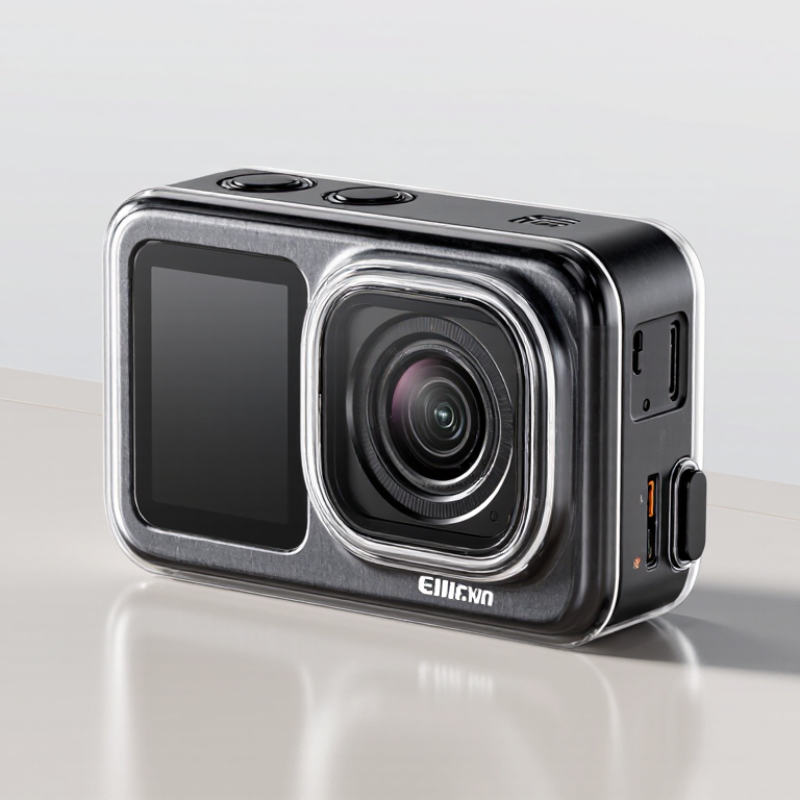
A compact wearable camera has little room between its lens, screen, buttons, and mounting points. That makes protection a fit problem, not simply a thickness problem. A loose cover can shift during movement; a tight one may press controls or block a microphone. Small, but exposed. Check that the lens opening sits above the glass rather than rubbing it, and that ports and vents remain clear. A soft lining also helps prevent grit from scratching the screen when the camera rides in a pocket.
The Camera & Imaging Products Association recorded 8.49 million digital camera shipments worldwide in its 2024 statistics. That figure reflects a broad camera market, not proof that any small camera is rugged. For practical protection, IEC 60529 defines dust- and water-ingress classifications, but those tests do not measure drop resistance. A cover should not be treated as a waterproofing upgrade unless tested as part of the complete setup. Look for a raised lens rim, secure closures, and access to charging and mounting points. I would still remove the cover now and then: trapped dust can do its own quiet damage. Fits are rarely perfect. Check the camera’s own care guidance before exposing it to water or heat.
A useful cover should protect the camera without blocking its lens, screen, buttons, or charging port. Check the fit carefully: a loose shell can shift in a bag, while a tight one may be awkward to remove. Look for raised edges around the lens and screen, plus soft inner material that will not scratch the finish. A textured outer surface can help when your hands are damp. Small details matter.
Material affects both protection and handling. Flexible silicone absorbs light knocks and offers grip, but may collect lint. A rigid shell can resist pressure from packed gear, though it adds bulk. For outdoor use, check whether the cover shields ports from dust and splashes; do not assume that a cover makes the camera waterproof. Also compare weight, strap openings, and whether the cover stays secure during movement. No design is perfect. I would prioritize a snug fit over extra features, though fit can be hard to judge from photos alone.
Tips: Check access with the camera mounted, and test removal before a trip. Wipe away grit first; trapped sand can rub against the surface. If possible, inspect the cover in person.
A protective cover should match how a small action camera is used, not just how it looks. A soft silicone sleeve adds grip and helps prevent light scuffs when the camera sits beside keys or tools. It stays flexible in cold weather, but lint can cling to its surface. Some sleeves also make buttons harder to feel with gloves.
A hard-shell cover offers firmer protection against knocks in a packed bag. Look for a snug fit, smooth edges, and openings that leave microphones and ports clear. Hard plastic can crack after a sharp drop, though, and a bulky shell may block mounting points. It is worth checking those details before buying.
Material matters most around the lens and moving parts. A raised rim can keep a flat lens from scraping a tabletop, while a loose flap may catch dust or shift during use. For wet outings, a water-resistant cover can help with splashes, but it should not be treated as a substitute for a verified waterproof rating. Small trade-offs add up. I would test the fit at home, including access to charging and controls. One detail is easy to overlook: a cover that traps grit can scratch the body instead of protecting it.
Choosing the best cover for a compact action camera starts with fit, not appearance. Check the camera’s dimensions and shape against the cover’s listed compatibility. A loose shell can shift in a bag, while a tight one may press buttons or make removal awkward. A snug fit matters. Leave the lens and microphones unobstructed, and make sure charging ports remain reachable without forcing the material aside.
Consider where you usually film. For walks and travel, a lightweight silicone or flexible polymer cover can help guard against scuffs from keys and grit. For rougher storage, look for reinforced corners and a raised edge around the display. These features can reduce everyday knocks, but they do not make a camera waterproof or impact-proof. Small details count. Check whether the cover interferes with magnetic attachments, clips, or a mounting bracket you already use.
Feel the material if you can. It should grip securely without collecting lint or feeling sticky after warm use. Cutouts should line up cleanly, and seams should not rub against the camera body. One trade-off is easy to miss: thicker protection may make controls harder to reach. That can be irritating. I would rather accept a few visible scuffs than struggle to remove a cover every time I need to charge the camera. Before buying, compare real user photos with the product measurements; listings can leave small fit differences unclear.
Use this guide to compare cover styles. Camera bodies and accessories can vary, so confirm the exact model’s dimensions, controls, and mounting system before buying.
| Selection factor | What to look for | Practical trade-off | How to check |
|---|---|---|---|
| Exact fit | A cover made for the precise camera version, with correctly positioned openings. | A close fit helps limit movement; a tight or mismatched cover can press controls or block access. | Compare the product’s stated compatibility and dimensions with the camera’s official measurements. |
| Cover material | Flexible silicone or thermoplastic polyurethane (TPU) for a soft, close-fitting sleeve; a rigid shell for a firmer barrier. | Flexible materials are generally easier to put on and remove. Rigid shells can add bulk and may cover more of the camera. | Check material details, edge coverage, and whether the cover can be removed without tools. |
| Lens clearance | An unobstructed lens opening, or a removable lens cap designed for storage. | A cap can help prevent scuffs during transport but must be removed before recording. | Check that the rim does not intrude into the camera’s field of view and that the cap stays secure in a bag. |
| Controls and ports | Openings or accessible covers for every control, microphone, charging port, and other required connection. | More coverage can make buttons and ports harder to reach; open cut-outs provide easier access but leave areas exposed. | Confirm access to the controls you use and test the fit without forcing the cover. |
| Mounting compatibility | A design that leaves the camera’s attachment points or required mounting interface usable. | A full-body cover may need to be removed before using some mounts or accessories. | Check the cover and mount instructions together; do not assume accessories fit through a covered interface. |
| Protection level | Coverage for the surfaces most likely to rub against keys, grit, or other items during storage. | A cover can help reduce everyday scratches, but it does not guarantee impact, water, or dust protection. | Look for clearly stated test conditions or protection ratings; avoid treating an untested cover as waterproof or drop-proof. |
| Heat and recording use | A cover that does not block ventilation areas or interfere with normal operation. | Thick or fully enclosed covers may be unsuitable during extended recording if they trap heat. | Follow the camera maker’s operating guidance and remove the cover if the device becomes unusually warm. |
| Best use case | A slim sleeve for pocket or bag storage; a more structured case for added separation from other gear. | Slim covers take less space, while larger cases generally add more bulk. | Choose based on how the camera is carried and whether it needs to stay mounted and ready to use. |
A protective cover should fit snugly without pressing the lens window, buttons, or charging flap. Check those points with the camera powered off, then open every flap once. It is a small test, but it can reveal a tight seam before a walk. The Outdoor Industry Association’s 2024 Outdoor Participation Trends Report counted 175.8 million U.S. outdoor participants. That is not a camera-protection study, but it shows how often small devices may meet dust, damp hands, and packed bags.
Choose a cover that stays secure when the camera moves, yet comes off without force. A loose edge can catch lint; an overly tight one may rub the finish. After a damp outing, remove the cover and let both pieces air-dry before storage. Brush grit away with a clean, soft cloth. I sometimes miss the seam near a flap. It is worth checking twice. A cover does not automatically make a camera waterproof: IEC 60529 defines ingress-protection ratings for enclosures, and the cover needs its own verified rating. If it has none, treat it as a buffer against scuffs, not a promise against water. Keep the lens area clear, and check for trapped grit before putting the camera away.
A practical guide to fit, care, and everyday use. Prioritize an exact fit and unobstructed lens; remove the cover before recording if it blocks a microphone, button, or port.
Scores are editorial guidance on a 1–5 scale, not measured product-test results. Check compatibility with your camera model and accessories before purchase.
It should stay snug without pressing buttons, the lens window, or charging flap. Check every opening before use.
A raised rim can help keep surfaces apart. Make sure it sits above the glass, not against it.
No. Treat an unverified cover as protection from scuffs, not water. Check the camera’s care guidance before exposure.
Confirm that ports, vents, and mounting points remain clear. Open each flap once to spot tight seams.
Use a soft lining and brush away grit with a clean, soft cloth. Check the cover before putting the camera in a pocket.
Remove the cover and let both pieces air-dry before storage. Don’t pack them away wet.
Check for loose edges and trapped dust regularly. I still miss the seam near a flap sometimes.
No. It should stay secure during movement but come off without force. Fits are rarely perfect.
Choosing a Protective Cover for DJI Osmo Nano starts with understanding the camera’s compact design and the areas most likely to need protection during everyday use. Compare covers by their fit, ease of access to controls, grip, weight, and ability to guard against scratches, bumps, and dust. Silicone, flexible polymers, and firmer shell materials each offer different trade-offs: softer options may improve grip and absorb minor impacts, while rigid covers can provide a more structured barrier but may add bulk.
The best choice in 2026 depends on how and where you use the camera, as well as how much coverage you want without obstructing its operation. Check that the cover sits securely, leaves essential openings accessible, and works with your usual mounting or carrying setup. Clean it regularly according to its material, let it dry fully, and inspect it for wear or looseness. A well-fitted cover balances practical protection with comfort and convenient daily use.